
Jumping into the VR world always feels a bit like stepping into something out of sci-fi, especially if you’re new to how everything works. VR tracking systems are what let you move around in that digital space and see your hands, head, or even your whole body show up right where it should be. Understanding the basics makes everything from setting up your first headset to playing your favorite games a whole lot smoother, and can help you sidestep the usual rookie headaches.
VR Tracking Systems Explained For Beginners
Every time you move your head, take a step to the side, or reach out in VR, a bunch of smart tech works together to track where you are and what you’re doing. VR tracking means keeping tabs on your position and movements in space so the headset and controllers know exactly where to put things inside the virtual world. Without good tracking, the whole experience can feel pretty weird – think floating hands out of place or jerky movements instead of the smooth response most folks expect.
This tech isn’t totally new. Early motion tracking showed up in animation and research, but VR systems now use clever tools to keep things accurate and responsive in your living room. The massive spike in interest for VR gaming, training, and design helps keep these technologies improving and more accessible for everyone.
Core Types of VR Tracking Technology
New VR users quickly come across terms like “inside-out tracking” and “outside-in tracking.” These are just different ways headsets and controllers figure out their position.
- Insideout tracking: This tech uses cameras and sensors built right into the headset. It tracks your movement by mapping out the room and objects around you as you move. Modern examples are the Meta Quest or Microsoft’s Windows Mixed Reality headsets.
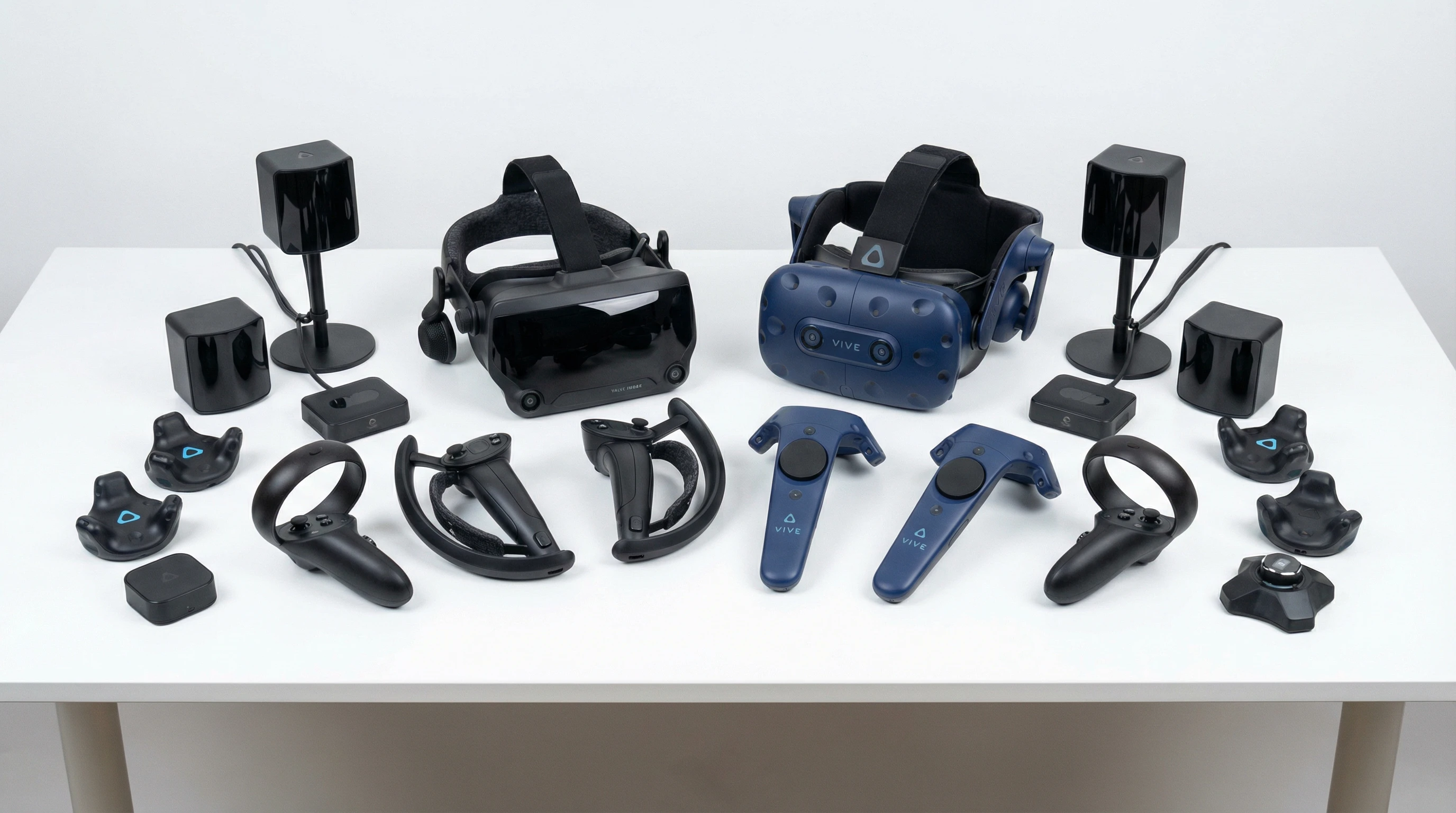
- Outsidein tracking: This setup relies on separate sensors or base stations placed around your room, watching you and the gear from the outside. Valve Index and HTC Vive use this method, offering strong tracking even when things get a little hectic.
Some more advanced gear blends both methods, adding extra sensors for more detailed movement. For most new users, knowing which approach your headset uses helps you set it up right and avoid some classic VR setup headaches.
It’s worth mentioning that some VR experiences now offer hand tracking, letting you use your real hands without controllers at all. This adds another dimension to VR, making things feel even more natural, especially for tasks like painting, grabbing objects, or giving virtual high-fives. As this feature develops, it’s becoming more accurate and reliable for a wider range of users.
Starter Guide: Getting Your VR Tracking Up and Running
The biggest hurdles for anyone new to VR often start with setup. Before you get into virtual worlds, it’s handy to know what’s involved in getting your tracking environment just right:
- Pick a Clear Area: Make sure the play space is tidy and free of tripping hazards. Extra furniture, shoes, or pets need to be out of your way. You’ll want enough space to stretch your arms and walk a few steps in any direction.
- Follow Setup Prompts: Most headsets will walk you through calibrating room boundaries. Take your time with this step because it helps the tracking system understand the edges of your available play area.
- Test Lighting: Good tracking needs decent lighting, but avoid direct sunlight on sensors or cameras. Some systems struggle in very dark or super bright spaces; finding a balance is worth testing.
- Update Firmware: Check for updates to your headset and controllers before jumping in. These upgrades often include important tracking improvements and bug fixes.
- Position Sensors (for outsidein): Set your base stations or trackers so they can cover as much of your play space as possible. Stick them at opposite corners, up high and pointing down to catch your movement from different angles.
Clearing your environment fully before starting up helps minimize interruptions from pets, family members, or awkward collisions. Spend a few minutes on these steps – what you see and do will line up way better in your virtual world.
What To Think About Before Investing in VR Tracking
Whether you’re looking at a standalone headset or a full VR setup with extra sensors, there are a few things worth considering:
- Tracking Accuracy: Entrylevel options sometimes miss smaller motions or lose track if you move too quickly. Higherend setups with more sensors deliver smoother, more consistent results, making your movements feel lifelike.
- Space Requirements: Some tracking systems work great even in small offices, while others need an entire room. Doublecheck your space before you choose your gear.
- Complexity of Setup: Builtin tracking (insideout) is usually fast to set up and more portable. Sensorbased tracking (outsidein) takes a bit more time but can deliver a stronger experience, especially for VR fitness or energetic games.
- Cost: More detailed tracking usually comes with a higher price. Starter headsets get you in the door, but setups for fullbody tracking or professional use will bump up the budget.
Tracking Accuracy
Cheaper systems are fine for sitting or standing games, but if you want to dodge, dance, or fight virtual enemies, smoother tracking feels way better. If you notice your movement lagging behind or “jumping” in the game, it might be time to tweak your setup or consider a headset with more advanced tracking.
Space Requirements
Bumping into walls can really kill the mood. Most systems work best in an open area that’s about two meters by two meters (or bigger). Some systems can handle tighter rooms, but you’ll have more fun with some space to move around freely.
Complexity
Wired headsets and separate base stations usually mean a few extra cords and things to set up around the room. Portable, solo headsets with insideout tracking are easy to take to a friend’s house or shift around your place with no sweat.
Cost
Entrylevel gear is much cheaper and great for the basics, but if blurring, lag, or limited motion starts bothering you, it’s probably worth saving up for an upgrade. Careful research helps buyers make solid decisions and gets you the experience you really want.
If you’re not sure which option fits best, tracking down user reviews or VR communities like r/virtualreality on Reddit can give loads of honest tips.
Level Up: Cool Tricks for Better Tracking
After you feel comfortable with your basic setup, a few small upgrades or tweaks can take your VR experience up a notch:
Manage Reflection and Lighting: Mirrors, windows, and other reflective surfaces can confuse tracking cameras or sensors. Cover them up for a better experience.
Why this works: It keeps the software from picking up fake signals, making tracking a whole lot more reliable.
Use Extra Sensors or Trackers: Some systems let you add more trackers for wrist, leg, or waist movement. This is ideal for dancing games or VR sports.
Why this works: It adds more points the system can track, which means your virtual body moves more naturally and accurately.
Keep Gear Charged: Some tracking hiccups happen just because controllers or sensors have low battery. Charge all your gear between sessions.
Why this works: It’s a simple way to keep things running smoothly without unwanted surprises.
Clean Sensors and Cameras: Dust and smudges can mess up optical tracking. Gently wipe lenses with a microfiber cloth now and then.
Why this works: It keeps your VR world crystal clear and your movements accurate.
Don’t forget about your headset comfort – taking proper breaks and adjusting fit can help your body handle longer VR sessions, and fresh face padding can step up both hygiene and comfort, especially if you enjoy regular active play.
Real Uses: Why Good VR Tracking Matters
Most people think of VR tracking as just for gaming, but it’s spreading like wildfire into plenty of other areas. Good tracking truly matters for a few reasons:
- Fitness & Dance: A VR fitness app relies on tracking your squats, arm swings, or other moves for a real workout. The better the tracking, the better your results.
- Education: Virtual science labs, art studios, or surgery simulations depend on precise tracking to help students practice safely and get real feedback.
- Design & Prototyping: Architects and engineers use VR to walk through plans before even the first brick is laid. Tracking accuracy here means they can reach, bend, and look at details just like in real-life spaces.
I set up a VR racing rig at home and saw way better lap times with fewer “crashes” after maximizing tracking accuracy – reacting in real-time and having my movement match exactly with what happened in the game made a huge difference. Even small improvements can turn a regular experience into something unforgettable. For folks learning new skills or practicing creative tasks, better tracking isn’t just more fun—it can seriously boost how much you get from each session.
Frequently Asked Questions
New VR users often ask a lot of the same questions, especially about tracking:
Question: My VR hands keep drifting away from my real hands. What should I do?
Answer: Try recalibrating your setup or check for any reflective surfaces in the room. Make sure everything’s charged and updated. Sometimes a quick headset restart does the trick too.
Question: Do I need a huge empty room to use VR?
Answer: Not always. Some systems work well with small spaces as long as you clear enough room to move comfortably. For bigger games or fullbody tracking, a bit more open area helps a lot and lets you really move.
Question: What’s the best tracking method for beginners?
Answer: Most new users do great with insideout tracking because it’s easy to set up and doesn’t require extra sensors. Once you’re hooked, you can always upgrade to more advanced setups if you want better detail or plan to play highmotion games.
Getting Started With VR Tracking Is Easier Than You Think
VR tracking might seem complicated at first, but once you get the basics, everything feels much more straightforward. Picking the right type of headset for your space, learning some quick setup tricks, and knowing how to keep your equipment in good shape are all you really need. As long as your space is safe and you keep your sensors and controllers happy, you’ll be set to explore all kinds of virtual adventures with smooth, responsive movement. The more you play around and tweak your setup, the better and more personal your VR world gets. Just remember: a little patience at the start, keeping things clean and updated, and making small improvements along the way can turn a simple setup into something immersive, eye-catching, and truly next-level cool.