
VR gaming is a whole new level of interactive entertainment, and I’ve gotten seriously hooked on all the ways it makes games more immersive. If you’re looking to get more out of your VR system, there’s a lot you can tweak and upgrade. Some changes are about the gear you use, and others are just smart habits that help your session feel smoother and more comfortable. So, I put together a deep look at steps you can take to boost your VR gaming experience, whether you’re a total beginner or have been plugged into virtual worlds for a while.
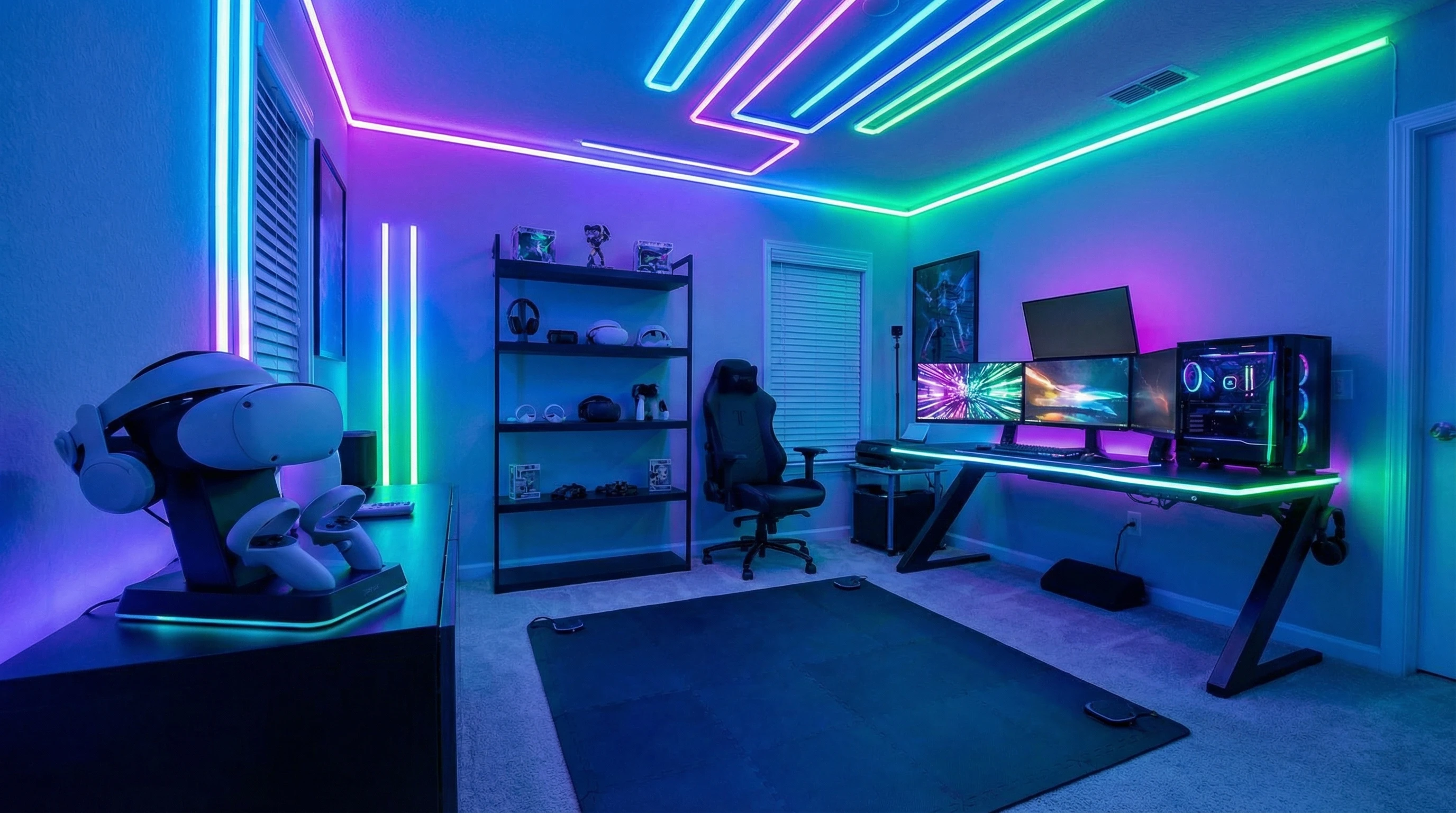
Why VR Gaming Experience Matters
The jump from standard gaming to VR isn’t just about switching screens; it’s about stepping into new realities where everything feels way more real. When the experience works, you forget you’re in your living room. When something’s off, like motion sickness from blurry visuals or laggy tracking, it can break the magic fast.
The global VR gaming market has been growing rapidly, with hardware becoming more affordable and a ton of fresh content rolling out in 2024. With all this growth, getting the most out of your hardware makes a pretty big difference in how fun and immersive each session feels.
VR first came onto the gaming scene as an experiment, but over just a few years it’s found real traction not just with hardcore gamers but also anyone looking for new ways to stay entertained or even move around more at home. A solid VR setup can totally change how you see classic games and introduce you to whole new genres.
Setting Up for the Best VR Experience
You don’t need a tricked out gamer cavern to have a good VR session, but a little setup goes a long way. The aim here is to be comfortable, avoid injury, and stop your controller from flying through the TV.
- Clear Your Space: Move coffee tables, cables, and anything else you can trip over. VR needs more space than you think. I learned this one from accidentally kicking a chair more than once.
- Good Lighting: Most VR headsets use cameras and sensors that need at least a little light. I’ve found that natural daylight is nice, but a well lit room works just as well. Avoid direct sunlight pointing at outside facing headset cameras.
- Floor Mats for Boundaries: Place a rug or foam mat where you stand or move. This helps you feel the edge of your playable area without needing to peek out from the headset constantly.
- Stable WiFi or Cabled LAN: For wireless VR (like PC VR streaming), I always use a 5GHz WiFi network or, for big sessions, just plug in. Lag in VR is no fun.
These small steps keep you safer and make each gaming session more hassle free. If you’ve already got a room ready, you’re halfway there!

Choosing and Tuning Your VR Hardware
Having the right headset and accessories can make a big difference. VR hardware keeps advancing, so there’s always something new. Your headset needs to match your device (PC, PS5, standalone, etc.), but here’s what else I like to consider:
- Comfort: Foam padding, balanced weight, and adjustable straps help your headset feel light, even during long sessions. Swapping in aftermarket padding is often worth it.
- Lens Spacing (IPD Adjustment): Getting the interpupillary distance right improves clarity and reduces eye strain. Take time to adjust this before your first session.
- Resolution & Refresh Rate: Higher specs mean sharper images and less motion blur. If you have the option, choose “performance mode” for smoother movement.
- External Accessories: Upgraded controllers, VR gloves, or custom face covers can make everything more responsive and comfortable. For PC VR, consider an external battery pack for longer play.
I’ve looked up plenty of headset roundups, and you don’t always need the newest release. Slight upgrades, like soft straps, longer charging cables, or better grips, can deliver a much nicer feel without a wallet crushing upgrade.
Boosting Visuals and Audio for Maximum Immersion
A lot of VR’s magic comes from its sights and sounds. Getting these dialed in turns a pretty cool setup into something genuinely transportive.
Optimizing Graphics
- Graphics Settings: On PC VR, adjust resolution and refresh rates in the game settings or SteamVR/Oculus options. Tuning “supersampling” gives you a crisper image, but make sure your PC can keep up.
- Keep Apps and Firmware Up to Date: Headset manufacturers and game studios are often smoothing out bugs and making visuals look better, so check for updates regularly.
- Cable Quality: When using a VR cable for PC VR, higher quality or shorter cables can lower latency and give a sharper image.
Audio for Deeper Immersion
- Use Good Headphones or Earbuds: Some headsets (like Quest 2) have okay built in audio, but adding lightweight headphones can make a huge difference in sound detail and positional accuracy.
- Noise Isolation: Closed headphones or noisecanceling earbuds help block out outside distractions. I usually play with the volume just high enough to drown out outside noise but not so loud I can’t hear someone knock.
VR is super visual, but the deep bass or directional footsteps really pull you in, especially for story driven games or horror titles.
Fighting Motion Sickness and Fatigue
Easily one of the biggest obstacles for new VR gamers is nausea, sometimes called “VR sickness.” Even seasoned players can feel off if they play for too long or switch to a new game with different movement mechanics. Here’s what’s helped me and lots of other players:
- Play in Short Sessions: Start with 20–30 minutes and take regular breaks. Over time, most people adjust and can play longer.
- Fan or Cool Air: Pointing a fan at yourself keeps you cool and helps trick your brain into feeling grounded. A lot of VR arcades actually do this on purpose.
- Experiment with Movement Settings: Many games offer smooth locomotion, teleport movement, or “comfort mode.” Try them all to see which style makes you the least queasy.
- Look Where You’re Moving: Keeping your real head movement aligned with ingame movement helps reduce discomfort.
If you start feeling dizzy or uncomfortable, pause and take a break before jumping back in. Don’t try to power through, it usually doesn’t help and you’ll feel weird for longer.
Accessories and Upgrades That Actually Make a Difference
Some VR accessories actually add something to your experience, not just to the price tag. Here are a few I’ve found super useful for both performance and comfort:
- Battery Packs: Clip on battery packs for wireless headsets double your play time and sometimes counterbalance front heavy designs.
- Grips and Gun Stocks: Silicone grips or gun stocks for controllers make action games way more immersive and just easier to play.
- Face Covers and Pads: Replace the original foam with machine washable pads, great for hygiene, especially if friends or family use your headset.
- Cable Management: If you’re tethered to a PC, ceiling cable retractors keep things tidy and out of your way.
Most of these are pretty easy to find online and are worth checking out, especially for comfort during long play sessions or keeping your gear clean.
VR Gaming Challenges and How to Avoid Them
- Battery Life: VR sessions can drain your headset or controllers quickly. Having extra battery packs or longer charging cables is pretty handy for playing more often and for longer.
- Overheating: Your headset, PC, or console can heat up, especially with graphically intense games. Keep your system in a well ventilated space, and pay attention if it gets too warm.
- Calibration & Tracking Issues: Headaches with tracking often come down to lighting or sensor placement. Recalibrate sensors regularly and avoid mirrors or shiny surfaces in view of your headset.
- Cleaning Gear: Sweat and grime build up fast. I wipe my headset down after each use with a gentle electronics friendly wipe. Lenses benefit from a microfiber cloth.
Fixing these little annoyances is pretty easy once you know what to watch out for. A little routine maintenance keeps things running smoothly and makes all your gear last longer.
Advanced VR Tips and Tricks
If you’re looking to really take your VR gaming up a notch, these tricks can make your gameplay shine:
- Custom Environments: Many VR systems let you load custom home environments or 3D backgrounds, personalizing your virtual space is just plain fun.
- Mixed Reality Recording: Playing with the camera modes lets you stream or capture gameplay with a real world background. Setting this up is perfect if you want to show off your moves online.
- Voice Commands: Some VR headsets support voice control for launching games, taking screenshots, or managing menus, saving time and hassle with your voice.
- Online Multiplayer: Joining VR communities through apps like VRChat, Rec Room, or online game lobbies can make memories and friendships like no other platform.
Trying out these advanced tools gives you something new to geek out on and makes the experience more personal every time you play.
Popular VR Use Cases Beyond Gaming
Gaming is the headline feature, but VR has become really popular for so much else lately. Here are a few growing use cases I see a lot:
- Fitness: Apps like Supernatural and FitXR turn exercise into a full blown VR adventure.
- Social Spaces: Hang out with friends in virtual cafes, movie theaters, or clubs without ever leaving your house.
- Art and Creativity: VR painting, sculpting, or music creation apps let you explore hobbies and new skills in ways you’d never expect.
It’s worth exploring some non-gaming apps on your device. You might stumble upon a new favorite way to unwind or learn something new.
Frequently Asked Questions
These are some questions that pop up all the time when people want to level up their VR setup:
Question: How can I make my VR headset more comfortable?
Answer: Swap in upgraded straps, softer face cushions, and balance weights or battery packs. Take breaks often, and adjust fit every time you put it on.
Question: Does PC hardware make a difference in VR?
Answer: Definitely. Stronger PCs let you run games at higher settings for smoother, sharper visuals and less motion sickness. Make sure your graphics card and processor meet the specs for your headset.
Question: Can you do VR wirelessly?
Answer: Some headsets support wireless PC streaming, but you’ll need a strong WiFi signal or use a dedicated router. Alternatively, standalone headsets skip cables entirely but might have fewer game choices.
Enjoying the Best of VR Gaming
Getting the most out of VR gaming really comes down to comfort, a bit of setup, and a few simple upgrades. Taking care of your gear and figuring out which accessories suit your play style goes a long way. With a smoother and more immersive setup, you’re ready to explore virtual worlds, play together with friends, and experience adventures in ways that just aren’t possible on a flat screen.
If you haven’t tried some of these tweaks, it’s definitely worth a shot; you might be surprised how much more fun your next session can be.
Looking ahead, the glow-up of VR tech will keep adding new experiences and genres for gamers of all types. Keep jumping into new games, checking out fresh accessories, and stay sharp to find out what’s coming up in VR. No matter your setup or experience level, VR offers something unique. The bottom line: with the right adjustments, your VR adventure will only get better from here.