
Setting up the best VR cable management for a wireless play space might sound funny; after all, isn’t the whole point of wireless VR to avoid cables? Still, anyone who’s spent time in a VR room knows there are always a few wires involved, especially when it comes to charging headsets, connecting sensors, or keeping backup battery packs nearby. Having a tidy and hazard-free play area is really important if you want to move comfortably and avoid tripping mid-session. I’ve spent hours trying different setups, so I’ll share what I’ve learned about keeping a wireless VR play space clean, efficient, and safe.
Why Cable Management Matters in a Wireless VR Space
Even if your headset is fully wireless, most VR rooms still have charging cables, power strips, extension cords for base stations, and wires for audio gear. Ignoring cable management can lead to accidental trips or snagged wires, and it’s a fast way to make your clean, high-tech VR room look messy. A few small organizers and a bit of planning can make a huge difference in how easy it is to play and keep your space flexible for friends, family, or different gaming setups. The peace of mind is totally worth it.
As wireless VR like the Meta Quest 3, Vive XR Elite, and Pico 4 get better, fewer cables are needed for headsets, but there’s usually still gear that needs charging or linking up. Most players will at least have power cords for charging stations, and it’s easy for those to get tangled. With good management, you get the true freedom of movement wireless VR promises. Plus, a tidy space gives a boost to both your focus and immersion, letting you relax and enjoy those energetic gaming sessions without worrying about stepping on cords.
Basic Cable Types You Might See in a “Wireless” Setup
Most VR play spaces still end up with some or all of these cables:
- Charging cables: USB-C or proprietary wires for your VR headset, controllers, or external battery packs.
- Base station power cords: Cords for external tracking modules, if you use a system like Valve Index or HTC Vive with Lighthouse sensors.
- Extension cords: To bring power across the room for charging points or sensor placement.
- Audio/Streaming cables: If you run external mics, webcams, or connect your headset to a gaming PC now and then.
Managing these is the trick to blending wireless freedom with day-to-day convenience. If you play in a busy household or multi-use room, good organization helps the space double as a chill spot, work nook, or even a movie theatre without tangled cords in sight.
Cable Management Starter Kit for Wireless VR
For people new to setting up a VR space, here are the first things I always use to keep cables tidy:
- Velcro cable ties: Wrap extra cords to keep them from dangling or bunching up.
- Adhesive-backed cable clips: Stick these along your walls, behind your desk, or even on the sides of shelves to guide cables where you want them.
- Cable sleeves or wraps: Bundle multiple smaller cables together for a clean look.
- Wallmounted charging docks: Hold your headset and controllers while charging and route cords neatly up the wall.
- Floor cord covers: Hide and protect any wires you need to run across the floor; nothing ruins immersion like stubbed toes.
Choosing basic accessories like this really helps keep your play space neat and easy to update as you change out gadgets or upgrade your setup. If you work with a lot of gadgets, don’t underestimate the power of simple solutions—they make it easy to stay organized even when you’re switching between headsets or adding a new sensor.
Popular Cable Management Ideas for VR Play Spaces
Building on that starter kit, there are a few creative tricks that make your setup easier to use and keep your room looking sharp:
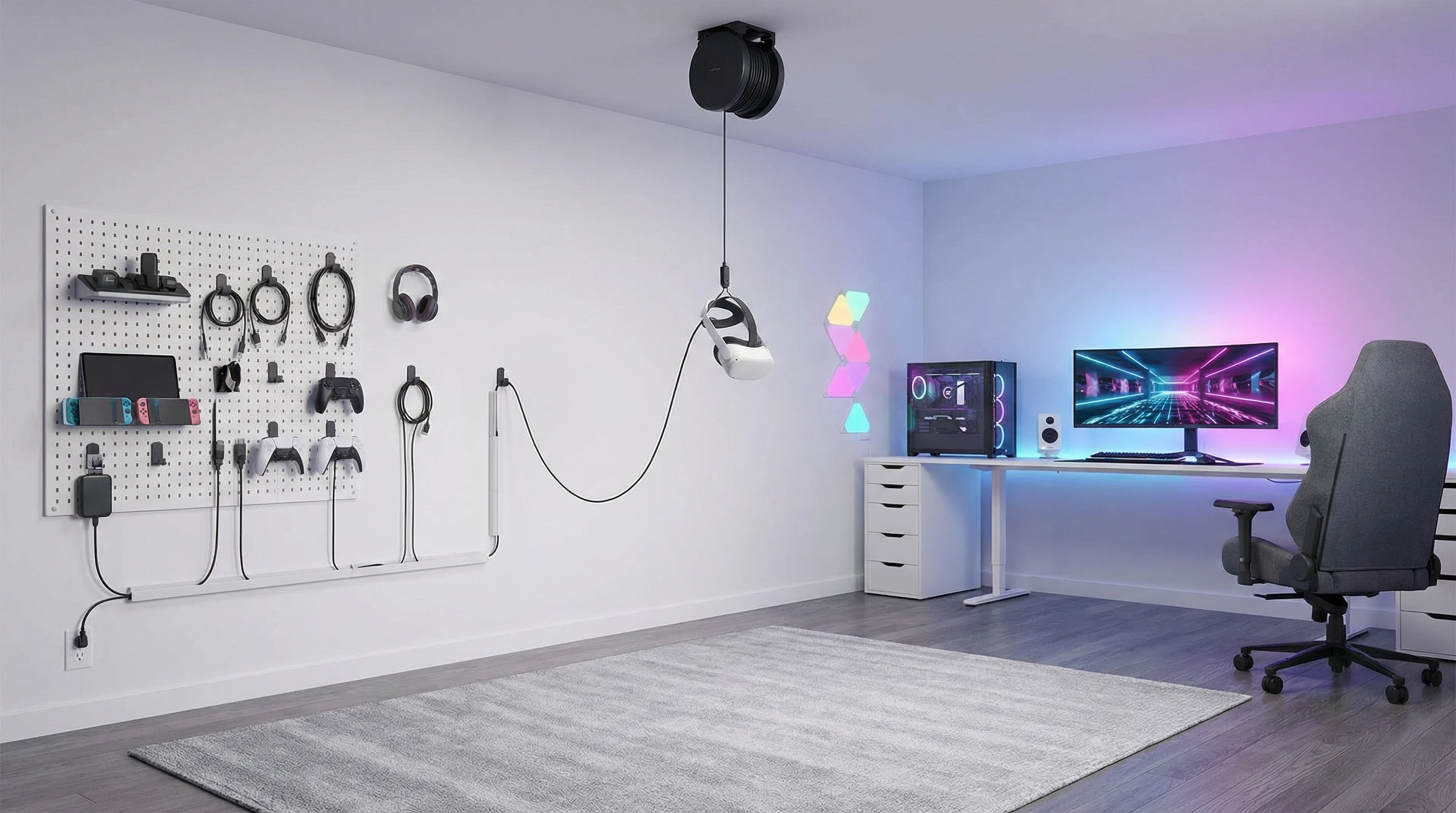
- Overhead Cable Management: If you switch to wired gameplay (like PC VR over a link cable), ceiling hooks with retractable reels let you suspend cables out of arm’s reach. For mostly wireless setups, you can use the same hooks to keep charging cords lifted and out of the way when not in use.
- Hidden Power Strips: Mount multioutlet strips underneath desks or shelves near your play area. This way, all your device chargers are in one easy-to-reach location, but nothing sits out on the floor.
- Smart LED Strips: Sometimes adding LED lighting along cable routes doubles as both a fun room upgrade and a way to shine a light on where cables are so people don’t accidentally trip. There are cable/LED combo tracks available, or you can run the strips right next to your floor cord covers.
- Magnetic Charging Cables: Swapping to magnetic tips means you can connect and detach your charging wires with one hand, handy during quick headset swaps.
Trying one or more of these brings a whole new level of polish to your play space. The goal is always keeping things off the floor and easy to update as your gear changes. Bonus: An organized room makes sharing VR with friends way easier, since they can grab and return gear without messing up your cable setup.
Top Accessories for LowMaintenance VR Rooms
If you want a wireless VR experience with minimum fuss, a few accessories stand out for unlocking safe, cablefree sessions:
- Wallmounted controller and headset racks: These let you dock your gear and run power cords directly up the wall, so nothing hangs loose.
- Underdesk cable trays: Slip power bricks and bundled cords away where you never see them; super useful if you switch between seated and standing play styles.
- Battery base stations with retractable cables: These offer tidy charging and only expose as much cable as you really need.
- Adjustable power banks: Look for power banks made for VR, with custom straps or wall mounts, to keep headset charging cables short and tidy without laying anything on the ground.
I’ve set up all sorts of play spaces, from open living rooms to packed bedrooms, and these additions never fail to keep things clean and safe. They also make routine tidying up a breeze, and you’ll spend less time troubleshooting stray cables when it’s time to show off a new game.
Common Mistakes that Mess with the VR Experience
I see the same cable-related problems in just about every VR room that isn’t set up with this stuff. Here are the big ones worth avoiding:
- Running charging cables across walkways where you’ll definitely trip on them during longer sessions.
- Letting multiple cords dangle from a shelf or table, ready to get snagged as you move around.
- Underestimating how much you’ll move; VR can make you forget where all those wires started out, especially after you play for a while.
- Leaving power bricks and surge protectors out in the open rather than tucked under or behind furniture.
Making a few small changes to cable placement and containment makes a big difference in feeling comfortable and confident while playing. When everything is in its proper place, you’ll focus way more on your actual games and less on avoiding accidents.
Extra Tips for Adapting Your VR Setup Over Time
Wireless VR play spaces don’t usually stay the same for long. As you switch headsets, add more tracking sensors, or upgrade your accessories, a setup designed around easy cable management pays off big time. Here’s how I approach evolving tech:
- Choose reusable velcro ties instead of zip ties so you can swap and adjust cable bundles anytime.
- Use colorcoded cable clips for different devices, making it easier to move plug-and-play chargers between different headset generations.
- Plan out cable runs along baseboards or shelves, instead of straight across open floor space, to keep routes short and tidy.
- Keep a small box with extra clips, ties, and covers—you’ll thank yourself later when it’s upgrade time.
The most fun VR rooms I’ve set up are the ones where cleaning up or changing things out only takes a few minutes. The space feels welcoming to guests, and I never worry about someone getting tripped up or pulling a power cord loose during a round of Beat Saber. Plus, if you ever rearrange your room or decide to test a new VR setup, you’ll be ready to mix things up quickly.
RealWorld Scenarios: Wireless VR Room Setups
A few quick examples help show how these tips work in everyday play spaces:
- Living Room Setup: I keep a wallmounted dock near the TV for my Quest headset and controllers, with charging cables running up the wall and clipped along the entertainment center. The only thing on the floor is the area rug; that’s it.
- Dedicated VR Room: Sensors for tracking are mounted high in the corners with power cords wrapped in sleeves up the wall. The main charging bank tucks behind a shelf, with all cables bundled and out of sight. No cables cross the play zone at any point, even when friends bring extra gear over. The space always looks sharp for visitors and gameplay is never interrupted.
- Bedroom Corner: Small rooms can be tidy too; a cable sleeve runs from my nightstand charging outlet behind a bookshelf, with only a tiny end poking out for my VR headset charger. Quick, neat, and easy to add another charger if needed.
Every setup will be a bit different, but sticking to the main ideas here gives you a smooth, cablefree wireless VR experience that’s always ready for action. Tidiness also leaves space for you to add fun extras like posters, RGB lights, or sound panels down the road.
Frequently Asked Questions
Here are a couple of quick answers to things that come up a lot for people setting up VR cable management:
Question: Can I make my play space completely cablefree?
Answer: While you can keep almost everything off the floor, you’ll usually have a few charging wires or power plugs tucked out of sight. The goal is to organize what’s needed instead of removing everything.
Question: What’s the safest way to handle power strips and surge protectors?
Answer: Try to mount these under shelves or desks with cable trays or ties. Only run power cords where you never walk or play to cut down on tripping hazards.
Question: Is ceiling cable management only for wired setups?
Answer: Ceiling hooks come in handy for pulling any type of cable upwards and out of the way, especially if you ever add a wired link for PC VR or want to keep rarelyused chargers out of sight.
Final Thoughts
Even in a wireless play space, smart cable management for VR makes your sessions easier, keeps everyone safer, and looks better. Testing different organizers and adapting as you go helps create a gaming area you’re proud to show off. With a tidy setup, you really get to enjoy the freedom that wireless VR offers, all without the clutter and hazards that come from messy cables. Remember, a little planning up front leads to many hours of smoother, safer, and more eye-catching play.